

Typical Buy Flow
Overview
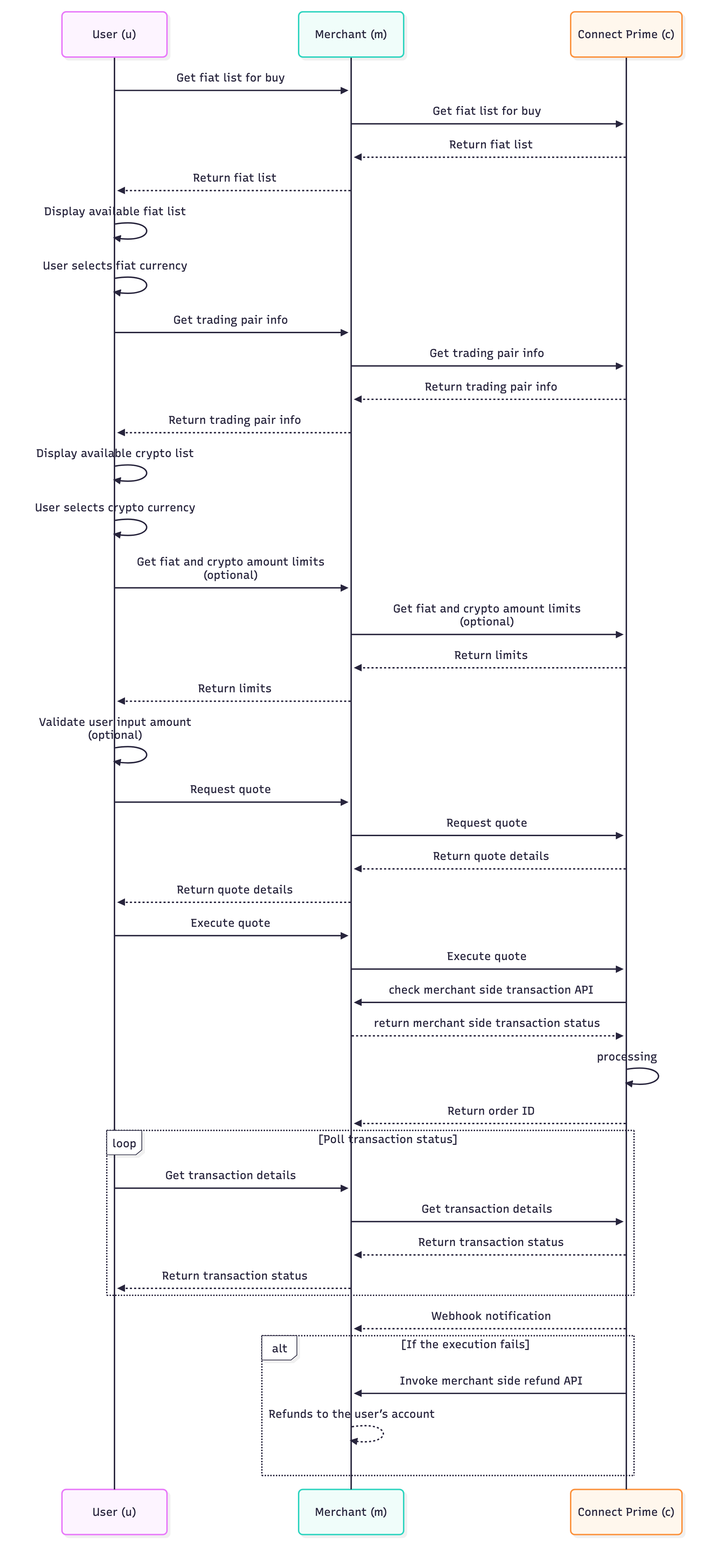
This document describes the standard cryptocurrency purchase flow using Binance Pay Prime service. The sequence diagram below illustrates the interaction between partner systems and Binance Pay Prime Open APIs throughout the purchase process.
Participants
- User (u): End user purchasing cryptocurrency
- Merchant (m): Partner's system/application
- Pay Prime (c): Binance Pay Prime service
Flow Steps
1. Get Fiat List for Buy
- User initiates the buy flow
- Merchant forwards the request to Pay Prime
- Pay Prime returns available fiat currencies for buy
- Merchant returns the fiat list to the user
2. Fiat Currency Selection
- System displays the available fiat list and sets the default fiat currency
- User selects their preferred fiat currency from the available list
3. Get Trading Pair Info
- User/Merchant requests available trading pairs
- Merchant queries Pay Prime for supported cryptocurrency trading pairs
- Pay Prime returns trading pair info
- Merchant returns trading pair info to the user
4. Display Available Cryptocurrencies
- System displays the available cryptocurrencies to the user
- User selects their desired cryptocurrency
5. Get Fiat and Crypto Amount Limits (optional)
- Merchant requests fiat and crypto amount limits from Pay Prime
- Pay Prime returns limits
- The merchant side can validate the user's input amount before requesting a quote and displaying
valid range to the user
- you can skip this step if not needed and quote API will handle the validation
6. Get Quote
- User inputs the buy amount
- Merchant requests real-time quote from Pay Prime
- Pay Prime returns quote details
- Merchant displays quote information to the user
7. Transfer Fiat to Binance's Account
- User confirms and decides to proceed with the purchase
- Merchant transfers the user's fiat to Binance's designated fiat account on the merchant side
- This is a merchant-internal operation — no Pay Prime API call is involved
- The fiat transfer must be completed before calling Execute Quote
8. Execute Quote
- Merchant sends execute quote request to Pay Prime
- Pay Prime processes the request and returns an order ID
- During the process, Pay Prime will invoke merchant's check transaction API to verify the fiat transfer in step (7) has been received
- If verification fails, Pay Prime will return an error and the order will not be created. Then Pay Prime will invoke merchant's refund API to refund the user.
- Refer to Merchant-side API Requirements for more details
- Order is officially created in the system
9. Transaction Status Monitoring
- System enters a polling loop to monitor transaction status
- Merchant continuously queries Pay Prime for transaction details
- Pay Prime returns current transaction status
- Status updates are relayed back to the user
- Process continues until transaction is completed
- Pay Prime sends webhook notifications to Merchant for status updates
Sequence Diagram
Was this page helpful?
Last modified on