Binance Pay Onchain › Institutional Embedded Buy/Sell Solution › Getting Started The private key and public key are generated by the partner (client). The partner (client) should
keep the private key securely and privately, and inform Binance Pay Prime of the public key, then
Binance Pay Prime will be able to verify the API requests from the partner (client).
Generating key pairs
You can use code or the OpenSSL tool to generate key pairs, depending on which one you prefer.
Generating key pairs with code
The example code below shows how to generate public and private keys:
import org.apache.commons.codec.binary.Base64; import java.security.KeyPairGenerator; import java.security.KeyPair; KeyPairGenerator generator = KeyPairGenerator. getInstance ( "RSA" ); generator. initialize ( 2048 ); KeyPair kp = generator. generateKeyPair (); String privateK = Base64. encodeBase64String (kp. getPrivate (). getEncoded ()); String publicK = Base64. encodeBase64String (kp. getPublic (). getEncoded ()); System.out. println ( "-----Generating private key-----" ); System.out. println (privateK); System.out. println ( " \n\n -----Generating public key-----" ); System.out. println (publicK);
Generating key pairs with OpenSSL tool
Please follow the steps below:
Generate private key with command:
openssl genpkey -algorithm RSA -out private_key.pem -pkeyopt rsa_keygen_bits:2048
Extract the DER encoding of the private key with command:
openssl rsa -in private_key.pem -outform DER -out private_key.der
Convert the DER-encoded private key to Base64 encoding with command:
openssl base64 -in private_key.der -out private_key.base64 -A | tr -d '\n' | sed 's/\//\//g'
*Please keep the file "private_key.base64" generated by this command securely and privately. The
private key will be used to generate the signature.
Generate public key with command:
openssl rsa -in private_key.pem -pubout -outform DER -out public_key.der
Convert the DER-encoded public key to Base64 encoding with command:
openssl base64 -in public_key.der -out public_key.base64 -A | tr -d '\n' | sed 's/\//\//g'
*Please send the file "public_key.base64" generated by this command to Binance Pay Prime for use
in verifying API requests.
Generating signature and set HTTP headers
The signature is generated by request body (json string), timestamp and partner (client) private
key, the following is the example code:
import org.apache.commons.codec.binary.Base64; import java.security.KeyFactory; import java.security.PrivateKey; import java.security.Signature; import java.security.spec.PKCS8EncodedKeySpec; import org.springframework.http.HttpHeaders; import org.springframework.util.MultiValueMap; public class TestRequestSigning { public static void main ( String [] args ) throws Exception { MultiValueMap< String , String > httpHeaders = new HttpHeaders (); String clientPrivateKey = "Your client private key" ; String jsonBody = "{ \n " + " \t\" id \" : \" 10000001 \" , \n " + " \t\" name \" : Jack \n " + "}" ; // Please use utf-8 encoding if body contains special characters such as emoticons. Long timestamp = System. currentTimeMillis (); PrivateKey cPrivateKey = generatePrivateKey (clientPrivateKey); String signature = sign (jsonBody + timestamp. toString (), cPrivateKey); httpHeaders. add ( "X-Tesla-Signature" , signature); } public static PrivateKey generatePrivateKey (String privateKey ) throws Exception { PKCS8EncodedKeySpec privateKeySpec = new PKCS8EncodedKeySpec (Base64. decodeBase64 (privateKey)); KeyFactory keyFactory = KeyFactory. getInstance ( "RSA" ); return keyFactory. generatePrivate (privateKeySpec); } public static String sign (String srcData , PrivateKey privateKey ) throws Exception { Signature signature = Signature. getInstance ( "SHA256withRSA" ); signature. initSign (privateKey); signature. update (srcData. getBytes ()); return new String (Base64. encodeBase64 (signature. sign ())); } }
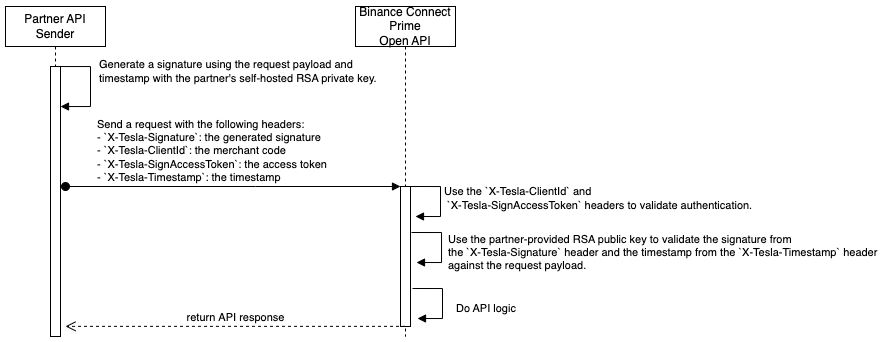
How signature works
The signature flow is as follows:
Use Postman to sign and test API requests
Configure environment variables
Create an environment (such as QA) in Postman and add these environment variables for subsequent
reference: base_url, client_id, access_token, private_key. Please note that the format of
the value of private_key should be like this:
----- BEGIN PRIVATE KEY ----- MIICdwIBADANBgkqhkiG9w0BAQEFAASCAmEwggJdAgEAAoGBANAAMnEOR1NIBIbwnDwHu19L / Jv0s4eEDHEjQ24OHjkHQ3CHWj4Ik4iFZyX9MvQsmZEzkDx8mJkkgAmIGjYkkZhEny1z6GPW55 + ruo4dLYIRurESYRufZxI49BtIeLOOwL9ZFOnVfxBh8T7xyCvMmMcF93Suv6RcbTWXk8EC0pkXAgMBAAECgYA2cXbChNxCfj1BHMWoKNXwkbEjGR / MvtGK45IIwoVCpBYQ5DzIs / H58AEZvnaR1wKzMO32Bx7iJt2koQ1LUrMQ0UB9ydxhP2BogHvt9ZDI49 + UPkTS92HMgPixi6O1HE6nOOu4rHR + 6j7pdGcB + dneTwgPngWdk71VsbX8ZzPZsQJBAOGPmztuIpgXCxPlyLWCuEa9zTKc9lHiBe65ZN1jvUq1GCLClVcx / oEtEb9CCo7u1vacr / 1sGFPxgBdvzv2y8HMCQQDsEfGEhp / 79keDnjvJZ + TLfP4r + u1Gw0gAuj4Cay316K3f3q2OEqNm9lMNzg5dVYb78sVRd + guZ88u9etRBX / NAkAheIrjdcNiaED3keiHrr8jmDSj5xDSM8UHmLEz / QHw3RCYz + ETUFLg3kw84lLoxN5XOAcRhwHRKwwD7k577RqrAkEAhBiGTOIII7Vrzvp7 + fdoz3ThxTpkC3S6la2hhTj0PuY0ZVD1TMqhJLwxPUhQQWnaXqE6SJwQD + eGx4BUbMHnAQJBAKomO + rK7ycU9OSRpEbPt2yQskwCcY2fiLgDy0Sy1hWmp / e5Cowt2Uyzp6uk / 4QwMkfFApYzWtvjrnRkru19rMw = ----- END PRIVATE KEY -----
Set up library postman-util-lib for Postman
Add a Postman global variable named pmlib_code, and set the value of it as the source code in the
library bundle content .
Configure HTTP headers: add Pre-request scripts to collection or request of Postman
Add the following code to the Pre-request script:
eval (pm.globals. get ( "pmlib_code" )); pm.request.headers. add ({ key: "Content-Type" , value: "application/json" , }); pm.request.headers. add ({ key: "X-Tesla-ClientId" , value: pm.environment. get ( "client_id" ), }); pm.request.headers. add ({ key: "X-Tesla-SignAccessToken" , value: pm.environment. get ( "access_token" ), }); const timestamp = new Date (). getTime (); let jsonBody = new String (); if (pm.request.body.raw) { jsonBody = pm.request.body.raw; } const dataToSign = jsonBody + timestamp. toString (); const privateKey = pm.environment. get ( "private_key" ); const sha256withRSA = new pmlib.rs. KJUR .crypto. Signature ({ alg: "SHA256withRSA" }); sha256withRSA. init (privateKey); sha256withRSA. updateString (dataToSign); const signature = pmlib.rs. hextob64 (sha256withRSA. sign ()); pm.request.headers. add ({ key: "X-Tesla-Signature" , value: signature, }); pm.request.headers. add ({ key: "X-Tesla-Timestamp" , value: timestamp. toString (), });
Everything is ready, feel free to test the API requests!
Last modified on October 20, 2026