

On-ramp APIs — Typical Flow
On-ramp APIs allow partners to offer a Binance-powered hosted fiat-to-crypto purchase flow. A user can start from the partner application, get redirected to the Binance-hosted checkout, complete payment through supported payment methods, and receive the purchased crypto at the configured destination.
When to use On-ramp APIs
Use On-ramp APIs when your application wants to help users acquire crypto through a hosted Binance-powered purchase flow.
Core Integration APIs used by this flow
On-ramp APIs use the shared Core Integration APIs for discovery, quote, order creation, order query, and webhook handling:
- Get Supported Trading Pairs
- Get Supported Crypto Networks
- Get Payment Method List
- Get Estimated Quote
- Create Order Link
- Query Order Details
- Order Status Webhook
Overview
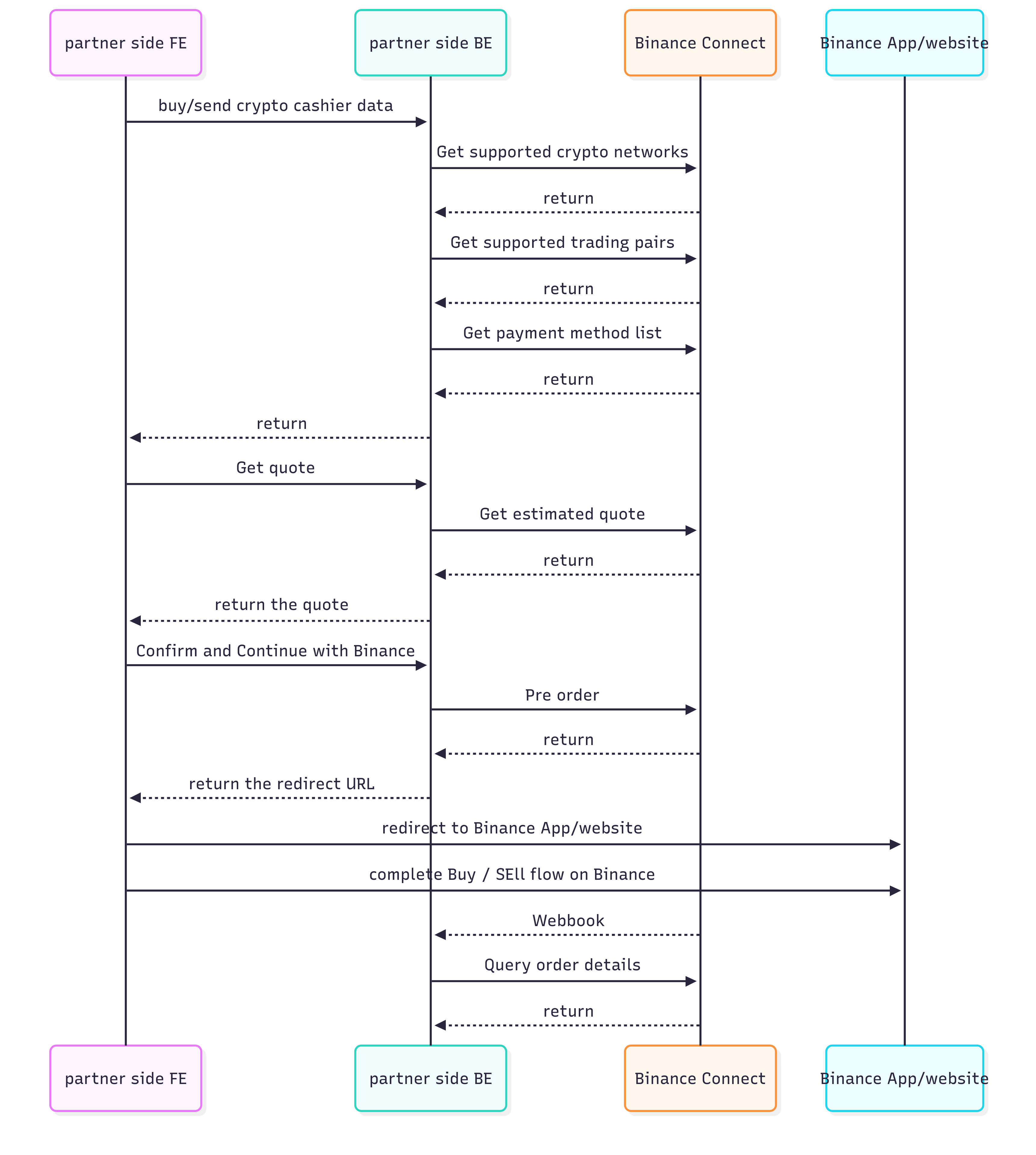
This document describes the standard cryptocurrency purchase flow using Binance Pay Onchain's on-ramp service. The sequence diagram below illustrates the interaction between partner systems and Binance Pay Onchain APIs throughout the purchase process.
Flow Steps
1. Initialize
- Partner frontend renders the buy interface for users
- Backend provides necessary configuration and settings (when applicable)
2. Query Options
- Fetch supported blockchain networks for crypto delivery
- Retrieve available trading pairs
- Get supported payment methods
- Return data to the frontend
- You can be done in parallel. Depending on your UI/UX design, you may choose to call these APIs in different sequences.
3. Get Quote
- Request real-time price quote for the selected trading pair, payment method and amount
- Display quote information to the user
4. Create PreOrder
- Submit pre-order request to Binance Pay Onchain with user's selection
- Receive a redirect URL for payment processing
5. Payment
- Redirect user to Binance
- User completes the purchase using their preferred payment method
- Binance processes the transaction
6. Confirmation
- Receive webhook notifications for order status updates
- Query order details to confirm final transaction status
- Update user interface with purchase results and crypto delivery details
Sample Create Order Link payloads
The examples below use Core Integration APIs > Create Order Link. Replace sample values with your own order ID, destination wallet address, redirect URLs, asset, network, and enabled payment methods.
Example 1 — Fixed fiat amount on-ramp
Use this pattern when the user chooses how much fiat to spend and receives the quoted crypto amount.
Code
Example 2 — Fixed crypto amount on-ramp
Use this pattern when the user chooses the crypto amount they want to receive. The required fiat amount is determined by quote and checkout.
Code
Example 3 — Let Binance-hosted checkout show available payment methods
Use this pattern when the partner does not want to preselect a payment method. Binance can show available payment options based on the user, market, fiat currency, asset, amount, and enabled configuration.
Code
Example 4 — P2P payment method selected
Use this pattern when the partner wants to route the user to a P2P-supported on-ramp method where available and enabled.
Code
Example 5 — Locked checkout attributes
Use this pattern when the partner needs the user to complete the checkout using the order attributes defined by the partner. This is useful when the partner must keep selected order details fixed after creating the order link.
Code
Mix and match customization
The payloads above are examples of common partner patterns. Partners can combine available request fields and approved customization keys to match their checkout requirements.
| Partner need | Fields or customization to consider |
|---|---|
| User spends a fixed fiat amount | amountType: 1, requestedAmount, fiatCurrency |
| User receives a fixed crypto amount | amountType: 2, requestedAmount, cryptoCurrency, optionally LOCK_ORDER_ATTRIBUTES |
| Partner wants to preselect payment method | payMethodCode, payMethodSubCode |
| Partner wants Binance to show available choices | Omit payMethodCode and payMethodSubCode where supported |
| Partner wants to keep selected order details fixed | LOCK_ORDER_ATTRIBUTES, if approved and enabled |
Important: The payloads above show request patterns using existing fields. Actual supported assets, networks, payment methods, and customization keys depend on partner enablement and should be confirmed with Binance before production use.
Related configuration
Depending on partner eligibility and product setup, On-ramp APIs may be used together with customized checkout behavior, Smart Convert Top-Up, Buy Any Token / Swap, supported asset configuration, supported network configuration, and payment method configuration.