

Binance Pay is a contactless, borderless and secure cryptocurrency payment technology designed by Binance. Binance Pay allows Binance customer to pay and get paid in crypto from your friends and family worldwide.
To begin, register your application with Binance Accounts, and get the SDK . For now, please
contact us.
Signature Rule (For server engineer)
Binance Pay backend will check the signature against pay param, including "certSn", "merchantId", "noncestr", "prepayId" and "timeStamp".
| Attributes | Type | Required | Limitation | Description |
|---|---|---|---|---|
| certSn | string | Y | - | API identity key issued by Binance payment system |
| merchantId | long | Y | - | The merchant account id, issued when merchant been created at Binance. |
| noncestr | string | Y | must be 32 digits | A random string with 32 bytes, e.g. random ascii decimal within a-z and A-Z and loop 32 times to form a random string |
| prepayId | string | Y | - | unique id generated by binance |
| timeStamp | long | Y | Binance pay only process request within 1s | UnixTimestamp in millis that the requests send, guarantee the machine time is sync with the network |
Signature generation logic is as below, please follow the parameters order. Use "=" connect field and value, use "&" to separate fields.
Code
Integrate SDK for Android
Requirements
- Android 4.1+
- Support AndroidX
Import SDK
- Download binance_pay_sdk_v1.0.0.aar
- Add
binance_pay_sdk_v1.0.0.aarinto libs directory - Add dependence for app module, just like this:
Code
- Sync project
Usage
1. Create BinancePayListener
Code
2. To Pay
2.1 Crypto payments(C2B)
Code
2.2 Transfer or send cryptos(C2C)
Code
Error Types:
Maybe you will encounter several situations:
- UnInstall Error:This means that you have not installed the Binance app, and then a pop-up window will be displayed to guide you to download
- UnSupported Error:This means that your Binance app version is too low, and then a pop-up window will be displayed to guide you to get the latest Binance app
- Other Error:Will be called back to you via BinancePayListener
Integrate SDK for iOS
Requirements
- iOS 10+
- Swift 5.1+
Installation
Munual
- Download BinancePaySDK.xcframework
- Add
BinancePaySDK.xcframeworkintoFrameworks, Libraries and Embeded Contentof your target - Embed Type should be
Embed & Sign
Usage
Pay
- Create
Request Parameters:
Code
- Call api:
Code
BinancePaySDK will show up an alert if user doesn't install Binance app on his/her device. The alert will show on the
containerView.
- Error Types: Here are the errors you may get from
BinancePaySDK:
Code
Language
Code
FAQ
Unable to trigger the Binance App
Include Binance Pay in the plist file to trigger Binance app
Code
Unable to redirect from Binance App back to your App
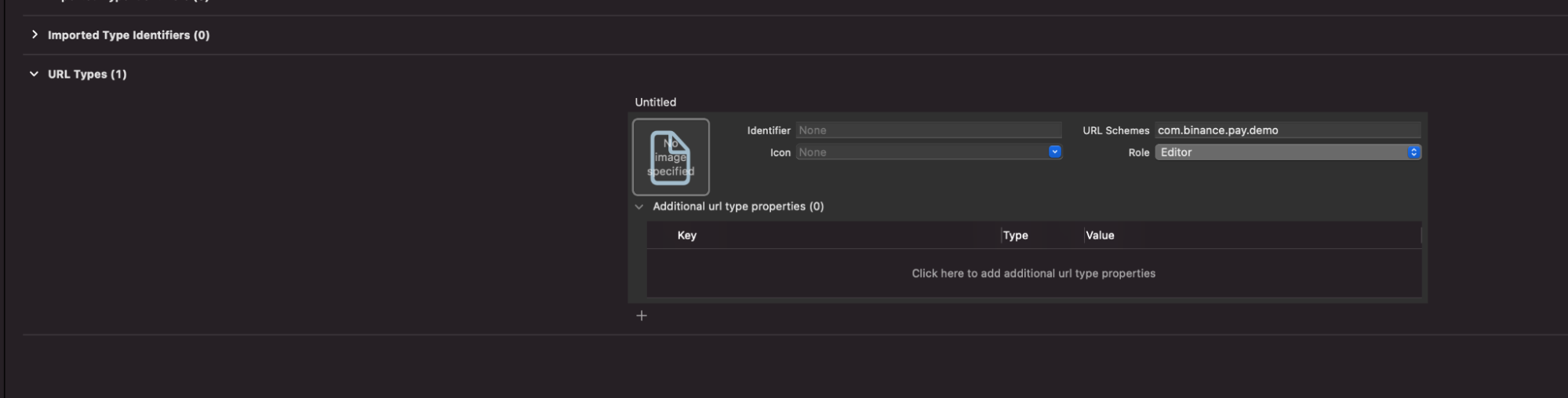
- Add your url scheme in Info Url Types
- Set this url-scheme as redirectScheme when using BinancePaySDK
Did not receive callback
Under AppDelegate: include the BinancePay.shared.handle function to receive callback.
Code